

In 2026, web archiving tools are more advanced than ever. While the Wayback Machine has been a staple for browsing old web pages, it has its limitations. From slow load times to inconsistent snapshots, many users are turning to alternatives for faster, more reliable results. In this guide, we explore the top alternatives you should consider this year, each offering unique features to suit different needs.
What Is the Wayback Machine?
The Wayback Machine is a digital archive that allows users to view past versions of websites. Launched in 2001, it has become one of the most well-known resources for exploring the history of the web. The Wayback Machine works by periodically taking snapshots of web pages across the internet and storing them for future access.
These snapshots are organized by date, allowing users to search for a specific page and view its version at a particular point in time. Whether you’re trying to find an old version of a website, explore how a company’s site has evolved, or track content that’s been removed, the Wayback Machine offers a valuable tool for digital preservation.
While the Wayback Machine is free and accessible to anyone with an internet connection, it does have its limitations. Not all websites are archived, and some pages may be missing or incomplete. Slow load times and occasional gaps in snapshots also lead many users to look for alternative archiving tools.
What to Look for in a Wayback Machine Alternative
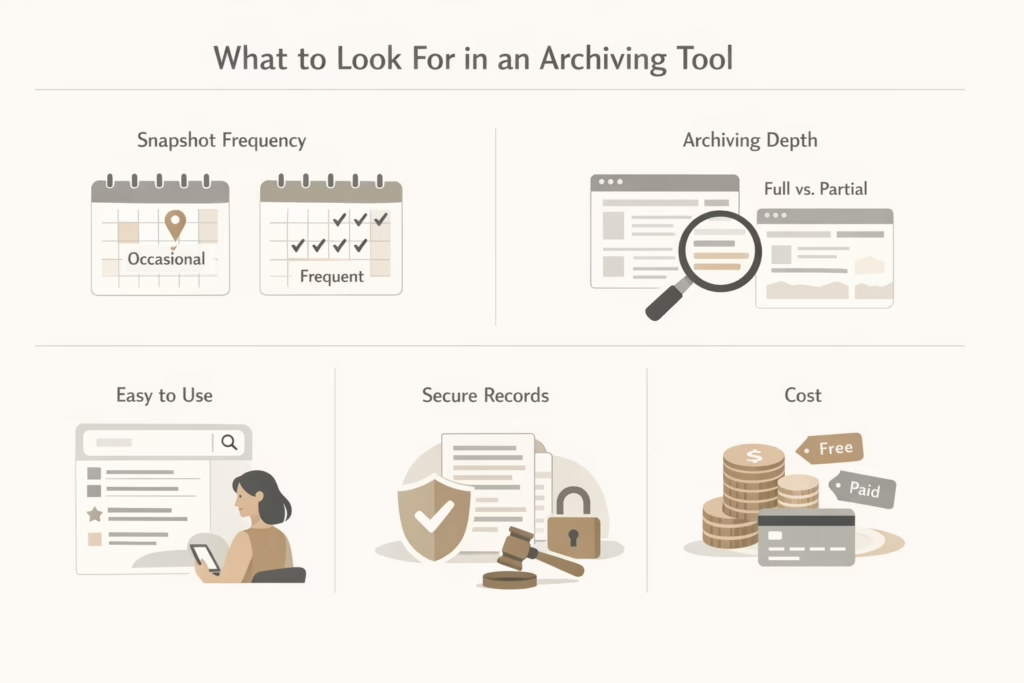
Before diving into specific alternatives, it’s important to know what to look for when choosing an archive tool. Here are the key factors that will help you make the best choice for your needs:
- Frequency of snapshots: Some tools take snapshots more frequently than others. If you need up-to-date versions of a page, consider an alternative that archives content in real-time or at set intervals.
- Depth of archiving: Not all web archiving tools capture everything on a webpage. Some may miss images, links, or other dynamic content. Ensure the tool you choose archives the elements most important to you.
- Ease of use: The tool should be intuitive and easy to navigate. Features like advanced search options and quick access to archived content are key to making the archiving process smooth and efficient.
- Legal and compliance needs: If you’re using a web archive for legal or compliance purposes, make sure the tool provides secure, tamper-proof records. Some services offer certified records, which are crucial in case of audits or legal disputes.
- Cost: While some tools are free, others require a subscription. The right choice depends on the features you need and your budget.
Top-Tier Solutions to Consider
As useful as the Wayback Machine is, it isn’t always the most efficient or comprehensive tool for every user. Whether you’re looking for more frequent updates, deeper content capture, or better user experience, several alternatives provide unique features that might be a better fit for your needs.
1. Archive.today
Archive.today, also known as Archive.is, is a simple, no-frills tool that lets users capture and save live web pages instantly. Archive.today allows for manual snapshots, but it also has automatic archiving.
Key Features:
- Allows users to capture and save live web pages instantly
- Supports both static snapshots and interactive versions
Why It’s Great:
Archive.today is perfect for those who need to preserve content quickly and easily. Journalists, researchers, and anyone needing to save “evidence” of a page before it changes or disappears will find this tool incredibly useful.
2. Stillio
Stillio is more than just a basic archive tool – it’s a visual website monitoring service that is tailored to businesses and marketers. This tool automates the process of capturing regular screenshots of web pages, offering snapshots at custom intervals, such as hourly, daily, or weekly.
Key Features:
- Captures automatic screenshots at set intervals
- Archives pages in PDF format, making them easy to store
- Designed for monitoring competitors and ensuring compliance
Why It’s Great:
For businesses that need to monitor competitors’ websites or track changes for legal purposes, Stillio offers a high level of customization and automation. Unlike the Wayback Machine, which offers snapshots on a more sporadic basis, Stillio ensures that businesses always have the most current version of a page saved.
3. Perma.cc
Perma.cc is a web archiving tool designed specifically for academics, legal professionals, and researchers who need to preserve citations and avoid “link rot” (the problem of broken links in documents). This tool allows users to create permanent, unchangeable links to web pages, ensuring references remain valid for future readers.
Key Features:
- Creates permanent links for web pages
- Widely used in academic and legal fields for citation preservation
Why It’s Great:
For anyone in academia or law, Perma.cc is invaluable. It offers a simple way to ensure that references in scholarly papers, legal documents, and academic publications remain accessible, preventing the dreaded issue of link rot.
4. Memento Time Travel
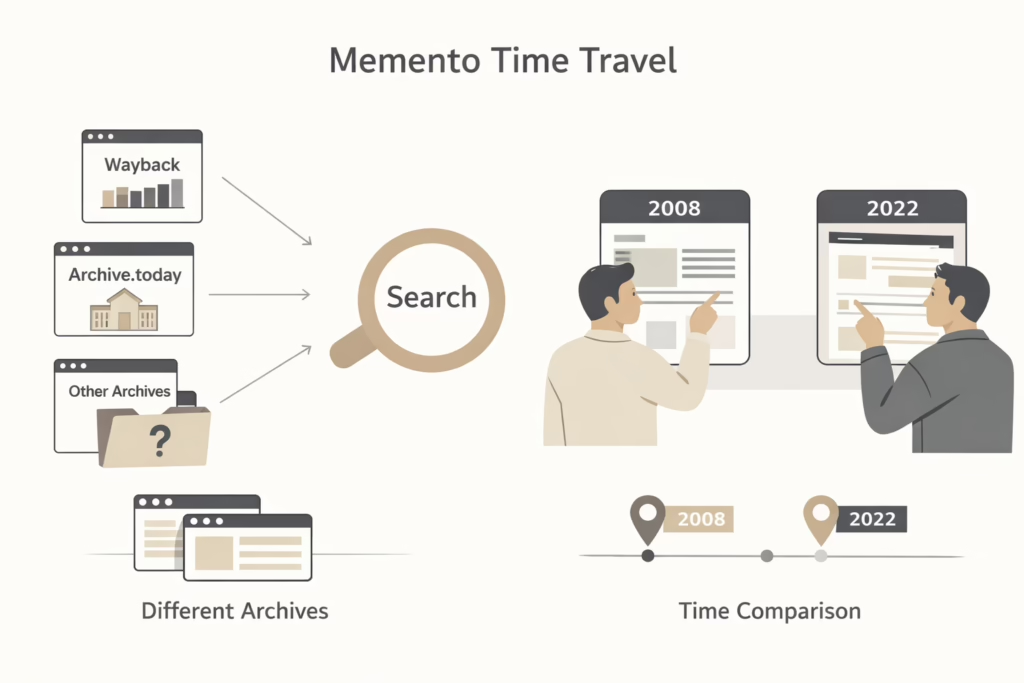
Memento Time Travel takes a different approach to web archiving. Instead of being a standalone archiving tool, Memento acts as a search tool that aggregates snapshots from multiple web archives, including the Wayback Machine and Archive.today.
Key Features:
- Aggregates snapshots from multiple web archives
- Provides access to specific versions of web pages from different points in time
- Completely easy to use
Why It’s Great:
Memento Time Travel is perfect for users who want to find snapshots across different sources, including multiple archives. Researchers and historians will find it particularly useful, as it gives them the ability to compare different versions of a page across multiple sources without needing to manually check each one.
5. PageFreezer
PageFreezer is a premium-grade web archiving solution designed for businesses, governments, and other enterprises that require legal and compliance-grade archiving. It offers real-time and automated archiving of websites, social media platforms, and even internal communication platforms like Slack.
Key Features:
- Offers real-time archiving of websites and social media content
- Provides secure, certified records suitable for legal compliance
- Focuses on enterprise-level needs for businesses and governments
Why It’s Great:
For companies in industries with strict regulations (such as finance, healthcare, or government), PageFreezer is a suitable choice. It ensures that all digital content is preserved accurately and securely, offering peace of mind for compliance and legal purposes.
6. WebCite
WebCite is an on-demand archiving service aimed at academic and scholarly needs. It allows users to archive specific web pages, creating permanent links that can be used in citations and references.
Key Features:
- Preserves web-based citations for academic and scholarly work
- Archives pages in multiple formats like HTML, PDFs, and images
Why It’s Great:
For researchers, authors, and students, WebCite is a critical tool to preserve cited content. It ensures that references remain accessible even if the original source is removed or updated.
7. Resurrect Pages
Resurrect Pages is a browser extension that helps users access archived versions of web pages when they’re down or unavailable. It pulls data from several sources, including the Wayback Machine, Archive.today, and Google Cache.
Key Features:
- Retrieves archived pages from various sources, including Google Cache and Wayback Machine
- Integrated directly into the browser for quick access
Why It’s Great:
If you frequently encounter broken links or need to access pages that are no longer available, Resurrect Pages is a game-changer. It simplifies the process of finding archived versions of content without having to manually visit multiple archives.
8. Yubnub
Yubnub is a unique command-line style web application that integrates with multiple archival tools, allowing users to quickly fetch archived content from different sources with a single command.
Key Features:
- Pulls archived content from multiple sources with a single command
- Features a simple command-line interface for quick access
- Allows fast retrieval without the need for a web interface
Why It’s Great:
Yubnub is best for users who prefer a minimalist, command-line style approach to web archiving. If you’re comfortable with using commands and want quick access to archived data, this tool offers an efficient, no-frills experience.
9. Webrecorder
Webrecorder is an advanced web archiving tool that can capture dynamic and multimedia-rich pages that the Wayback Machine often struggles with. It offers a much deeper level of capture, including videos, interactive scripts, and social media content.
Key Features:
- Captures dynamic, interactive, and multimedia-rich content
- Supports archiving JavaScript-heavy pages
Why It’s Great:
Webrecorder is ideal for digital preservationists, researchers, artists, and more who need to preserve complex web pages that contain dynamic content. It’s especially valuable for preserving websites with interactive features or multimedia that are integral to the user experience.
10. GitHub for Web Archiving
While not a traditional archiving tool, GitHub can be used as a web archiving solution for developers and tech-savvy users. By creating repositories to store web pages, codebases, and other digital assets, GitHub ensures that content remains accessible and preserved over time.
Key Features:
- Provides a platform to store web pages, code, and documentation
- Allows collaboration on web archiving projects
- Offers version control to track changes and preserve content over time
Why It’s Great:
For developers and technical users, GitHub offers a highly customizable and collaborative way to archive content. If you’re looking to preserve code, documentation, or specific web content, GitHub is a valuable tool that provides more control over how and what is archived.
Conclusion
While the Wayback Machine is still a go-to resource for many, these 10 alternatives offer a variety of unique features that may better meet your needs in 2026. From simple tools like Archive.today to more complex solutions like PageFreezer and GitHub, there’s a web archiving tool for everyone – whether you’re looking for frequent snapshots, deep content capture, or compliance-ready archiving.
Choosing the right alternative depends on your specific requirements. Whether you need a free tool for casual use or an enterprise-level solution for legal compliance, these options provide flexibility, reliability, and ease of use that the Wayback Machine sometimes lacks. So, explore the options, pick the one that fits your needs, and start preserving the digital history you care about.
FAQ
1. Are these Wayback Machine alternatives free to use?
Many of the tools we’ve mentioned, like Archive.today and Memento Time Travel, allow you to capture and browse archived content. However, some alternatives operate on a subscription basis due to their premium features, like automated snapshots or compliance-grade archiving. So, it really depends on the tool you choose and the features you need.
2. Can I use these tools to archive pages behind paywalls?
Archiving pages behind paywalls can be tricky. Most tools, including the Wayback Machine, generally cannot capture content that is gated or requires a subscription. That said, some tools like Archive.today can capture certain content even behind paywalls, but it’s not guaranteed. If you’re working on research and need to preserve such pages, it’s a good idea to save a snapshot of what’s visible before any content is hidden.
3. How secure are the archived pages?
The security of archived pages depends on the tool you choose. For example, PageFreezer offers secure, tamper-proof records that meet legal and compliance standards, making it ideal for businesses and government use. On the other hand, free tools like Archive.today don’t have the same level of security but still provide reliable archiving for personal use or general reference.
4. Can I retrieve deleted pages with these alternatives?
Yes, many of these tools, especially Resurrect Pages and Memento Time Travel, help you locate deleted or missing pages by pulling from multiple archives. While it’s not guaranteed that a deleted page will always be recoverable, these tools aggregate data from several sources to increase the chances of finding archived content.
5. Which tool is best for legal and compliance needs?
For legal professionals or businesses that need reliable, certified web archives, PageFreezer is the top choice. It offers secure, tamper-proof archiving that ensures compliance with industry regulations. It’s specifically designed for organizations that need to meet legal standards and provides a certified record of all archived content. Stillio is also a good option for regular snapshots of competitors’ websites or other pages for compliance purposes.
6. Can I access archived pages on mobile devices?
Yes, most of these tools, including the Wayback Machine, Archive.today, and Memento Time Travel, allow you to access archived pages from mobile devices. They’re compatible with most smartphones and tablets, so you can easily browse and view old versions of websites while on the go. However, keep in mind that some tools may have limitations or require a more extensive process for certain features on mobile.
7. How do I choose the best Wayback Machine alternative for my needs?
Choosing the right alternative depends on what you’re looking for. If you need quick, on-the-go access to old pages, tools like Resurrect Pages and Memento Time Travel are great for fast retrieval. For businesses or legal use, PageFreezer is the most secure option, while Stillio excels at capturing frequent snapshots of competitor websites.