
Canceling FuboTV is not difficult, but it’s also not something you want to rush through. The steps change depending on how you signed up, and skipping one detail can mean extra charges, a trial ending early, or a subscription that keeps renewing when you thought it was done.
This guide walks through how FuboTV cancellation actually works. No marketing language, no shortcuts that don’t stick. Just the real steps, what to watch out for, and how to confirm that your account is truly canceled so it doesn’t come back on your next bill.
Before clicking anything, it helps to slow down for a minute. Where you signed up matters more than people expect, and FuboTV will not cancel subscriptions that are billed through another platform. Getting that part right upfront saves time and frustration later.
Before You Cancel FuboTV: One Thing You Must Check First
Before clicking any cancel button, stop and answer one question:
Where did you originally sign up for FuboTV?
This matters more than most people realize. FuboTV does not have the ability to cancel subscriptions that are billed through third-party platforms. If your billing runs through Roku, Apple, or Google, canceling inside the FuboTV website will not stop the charges.
There are three common signup paths:
- Directly on the FuboTV website
- Through Roku
- Through Apple or Google subscriptions on a phone
If you are not sure which one applies to you, do not guess. Log in to your FuboTV account and open the account or subscription page. If your billing is handled by a third party, it will be clearly labeled. This step alone prevents most cancellation problems.
How to Cancel FuboTV If You Signed Up on the Website
If you created your account directly on the FuboTV website, the cancellation process stays entirely within your Fubo account. This is the most straightforward scenario.
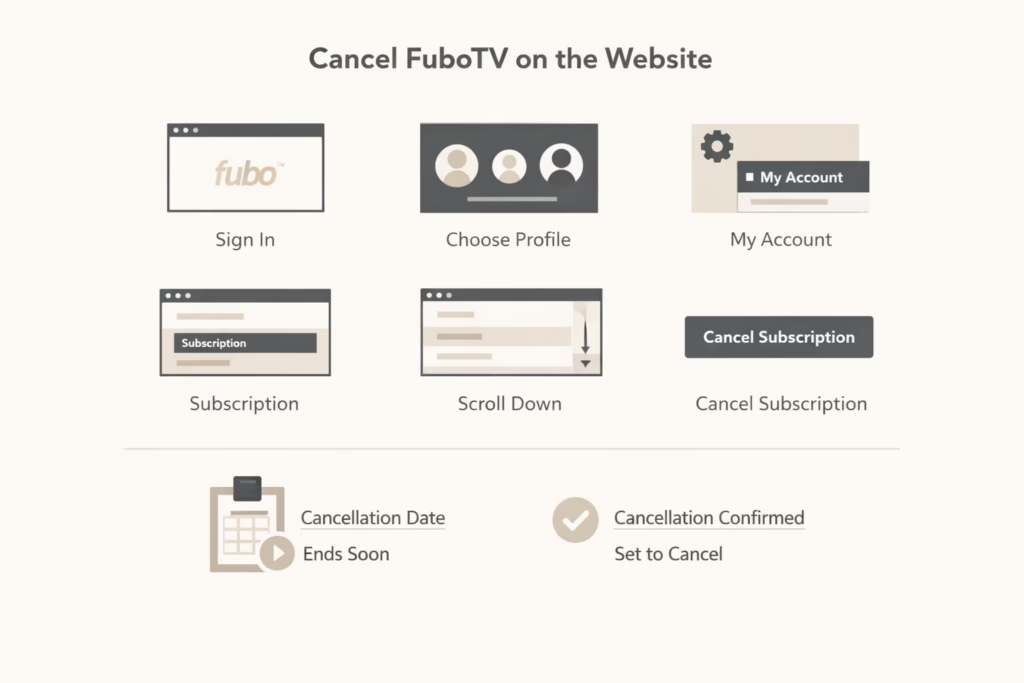
Step-by-Step Cancellation on the FuboTV website
- Sign in to your FuboTV account using a browser
- Choose your profile if prompted
- Open account settings and go to My Account
- Select Subscription or Subscription and Billing
- Scroll to the bottom of the page
- Click Cancel subscription
At this point, FuboTV may try to retain you. You might see an offer for a discount or a paused subscription. This is optional. Your subscription is not canceled until you explicitly confirm cancellation.
Choose Cancel subscription and complete the final confirmation. You should see a message confirming that your cancellation was successful.
What to Do After Canceling
Once you cancel, do not close the browser immediately. Take a moment to confirm your status:
- The account page should show a cancellation date
- You may see language like “set to cancel”
This means your subscription will stay active until the end of your current billing cycle, then stop automatically.
How to Cancel FuboTV If You Signed Up Through Roku
Roku-managed subscriptions are one of the most common sources of confusion. If you signed up for FuboTV through Roku, FuboTV cannot cancel it for you. You must cancel directly through Roku.
There are two ways to do this.
Canceling Through the Roku Website
- Go to your Roku account page and sign in
- Open your list of subscriptions
- Find FuboTV in the list
- Select Unsubscribe
- Confirm the cancellation
After confirmation, you will usually see a Renew option instead of Unsubscribe. That is a good sign. It means the subscription is scheduled to end.
Canceling Directly on a Roku Device
- Press the Home button on your Roku remote
- Highlight the FuboTV channel
- Press the star button to open options
- Select Manage subscription
- Choose Cancel subscription
- Confirm the cancellation
Roku will show the date when your access ends. Make note of it.
How to Cancel FuboTV on iPhone or Android
Phone subscriptions add another layer because billing is handled by Apple or Google, not FuboTV.
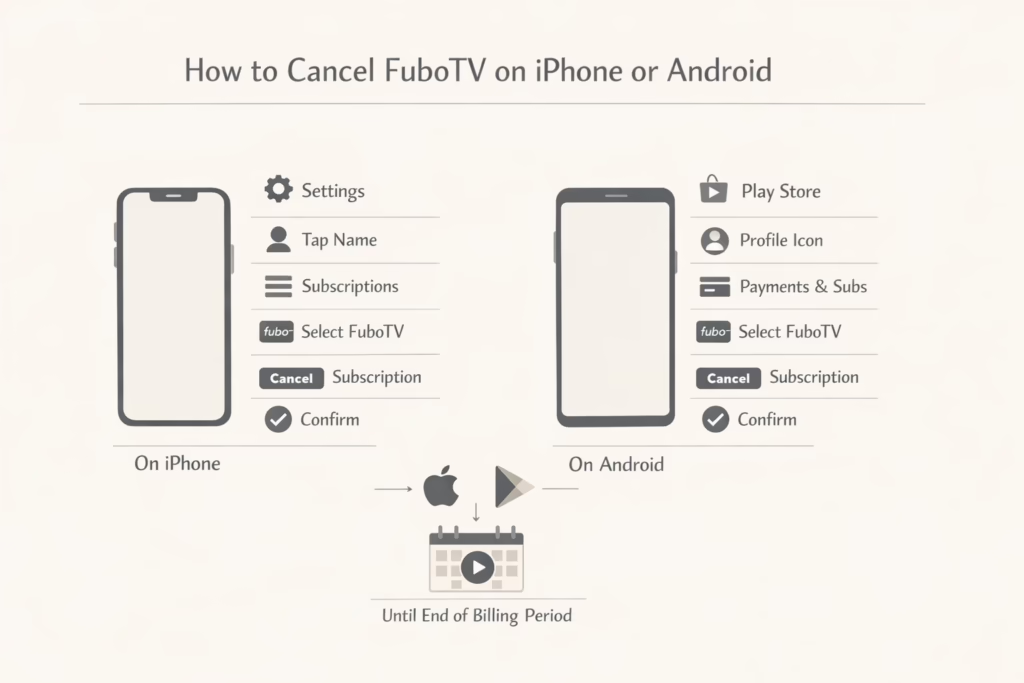
Canceling FuboTV on iPhone
If you subscribed through an iPhone or iPad:
- Open the Settings app
- Tap your name at the top
- Select Subscriptions
- Find FuboTV
- Tap Cancel Subscription
- Confirm when prompted
Once canceled, Apple manages the rest. You can continue watching until the billing period ends.
Canceling FuboTV on Android
If you subscribed through Google Play:
- Open the Google Play Store
- Tap your profile icon
- Go to Payments and subscriptions
- Select Subscriptions
- Choose FuboTV
- Tap Cancel subscription
- Follow the prompts
As with Apple, cancellation takes effect at the end of the current billing cycle.
What Happens If You Cancel During a Free Trial
Free trials behave differently from paid subscriptions, and this catches people off guard.
If you cancel FuboTV during a free trial:
- Your access ends immediately
- You do not keep watching until the trial end date
- You will not receive another free trial later
If you want to use the full trial period, wait until the last day before canceling. Just do not forget. Trial charges usually convert to paid plans automatically.
How to Confirm That Your FuboTV Subscription Is Really Canceled
This step is often skipped, and it causes most billing disputes.
After canceling, log back into your account or subscription platform and check the status carefully.
If Your Account Says “Set To Cancel”
This means:
- You still have access until the billing cycle ends
- No new charges should occur after that date
- You are fine as long as the cancellation date is visible.
If Your Account Shows Reactivation Options
If you see buttons or prompts to restart your subscription, that usually means the cancellation already went through.
Do not click anything else. Simply log out.
Common Mistakes That Cause Ongoing Charges
Most FuboTV billing problems are not caused by system errors. They usually come down to a few predictable mistakes that are easy to make if you are moving too quickly or assuming the process works the same everywhere.
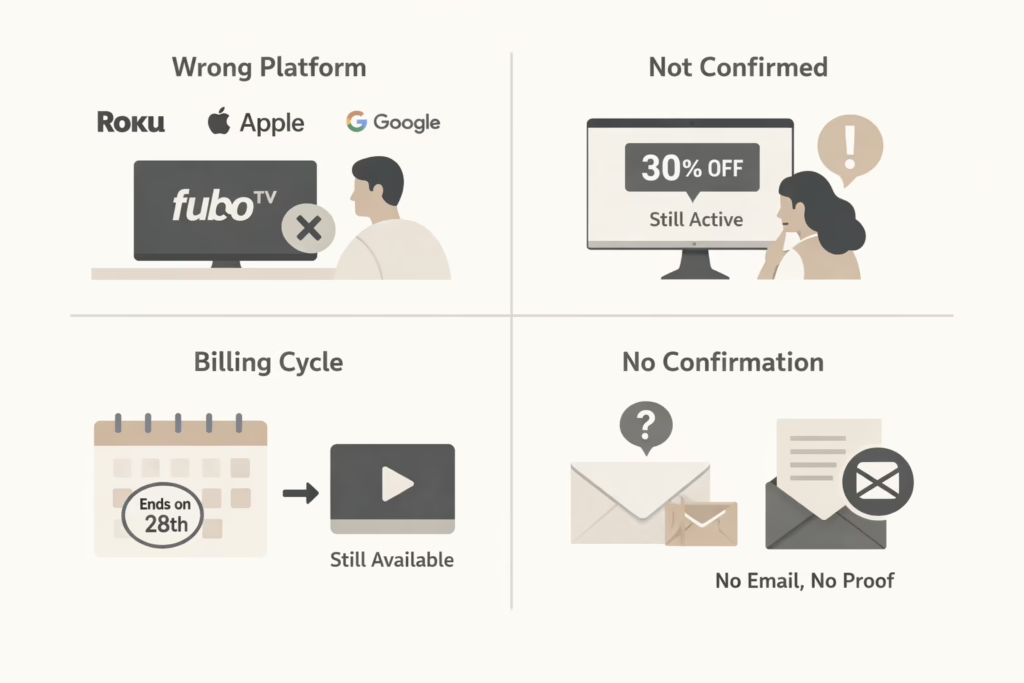
Canceling in the Wrong Place
This is the most common issue. Canceling inside the FuboTV account does nothing if your subscription is billed through Roku, Apple, or Google. The account may look inactive, but the billing platform will continue renewing the subscription in the background. Always cancel directly through the service that handles your payments.
Assuming a Discount Screen Means Cancellation
FuboTV often presents a discount or retention offer during the cancellation flow. If you close the page or back out without completing the final confirmation, the subscription stays active. Until you see a clear cancellation message, nothing has changed.
Forgetting About the Billing Cycle
Canceling does not always mean immediate loss of access. Many people see that they can still watch content and assume the cancellation failed. In most cases, the subscription is set to end at the close of the current billing period. Access continues until that date, then stops automatically.
Losing Confirmation Details
Confirmation emails and on-screen messages matter more than people think. If something goes wrong later, support teams will ask for dates and proof. Saving a screenshot or email confirmation makes resolving billing disputes much easier and faster.
Why Charges Sometimes Appear After Cancellation
Seeing a charge after canceling does not always mean something went wrong.
Common reasons include:
- The charge was processed before cancellation
- The billing cycle ended after the cancellation date
- The subscription was canceled on the wrong platform
If the charge date is before the cancellation confirmation time, it is usually valid.
If not, contact support with your confirmation details.
Can You Pause FuboTV Instead of Canceling?
FuboTV sometimes offers a pause option when you start the cancellation process. This can be useful if you only need a short break and expect to come back. Pausing stops billing for a limited time while keeping your account, profiles, and settings in place, so you do not have to set everything up again later.
That said, pausing is not available for every account or billing method. Some subscriptions, especially those managed through third-party platforms, may not support it at all. If the option appears, read the terms carefully and check how long the pause lasts. A paused subscription is not the same as a canceled one, and billing will usually resume automatically when the pause period ends.
What Happens to Your Account After Cancellation
Canceling FuboTV does not delete your account. Your profile, preferences, and basic settings remain saved, which makes it easy to come back later if you change your mind. In many cases, your watch history also stays linked to the account, so you can pick up where you left off if you resubscribe.
If you want your subscription to stay canceled, be careful when logging in after cancellation. Seeing reactivation options is normal, but clicking them can restart billing immediately. If you are only checking your status, confirm the cancellation details and then sign out without making any changes.
Final Thoughts: Canceling FuboTV Without Stress
Canceling FuboTV is not complicated, but it does require attention. Most problems happen when people rush or assume all subscriptions work the same way.
Take a minute to confirm where you signed up. Follow the correct cancellation path. Check your status afterward. That is usually enough to avoid surprise charges and wasted time.
Streaming subscriptions are designed to start easily. Ending them takes a little more care. Once you know the rules, the process is straightforward and under your control.
Frequently Asked Questions
Can I cancel FuboTV at any time?
Yes. You can cancel your FuboTV subscription at any point. There is no long-term contract for standard plans. However, canceling does not always stop access immediately. In most cases, you keep watching until the end of your current billing cycle.
Will I get a refund if I cancel early?
No. FuboTV does not offer prorated refunds. If you cancel halfway through a billing period, you can continue using the service until that period ends, but you will not receive money back for unused days.
Why does FuboTV still show as active after I canceled?
This usually means your subscription is set to cancel at the end of the billing cycle. As long as your account shows a cancellation date, this is normal. Access remains available until that date passes.
Can FuboTV cancel my subscription if I signed up through Roku, Apple, or Google?
No. FuboTV cannot cancel subscriptions that are billed through third-party platforms. You must cancel directly through Roku, Apple ID, or Google Play, depending on how you signed up.
What happens if I cancel during a free trial?
If you cancel during a free trial, access ends immediately. You do not get to finish the remaining trial period, and you will not be eligible for another free trial later.